
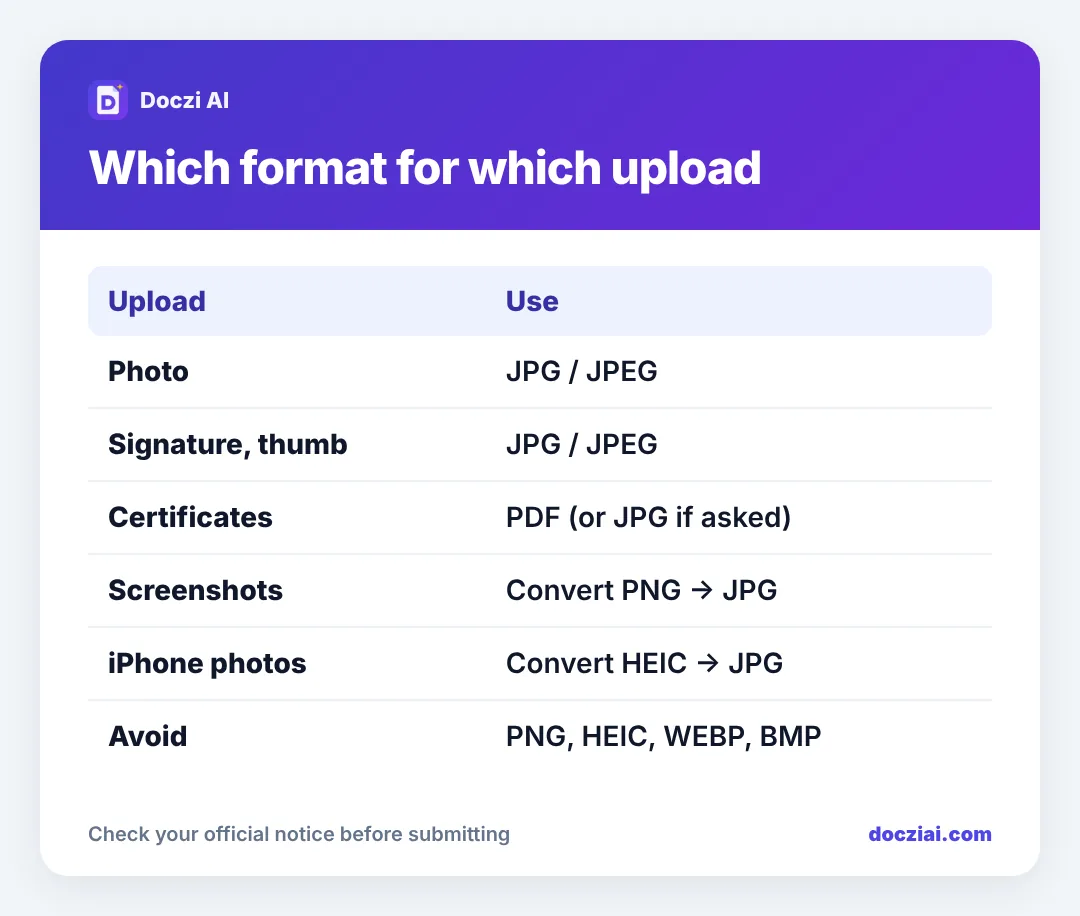
JPG vs JPEG is not a real choice: they are exactly the same format with two spellings, so if a form asks for JPEG, a .jpg file is fine. Almost every Indian government and exam form wants photos and signatures as JPG. PNG is accepted only when the form says so, and iPhone HEIC photos are rejected nearly everywhere, so convert them to JPG before you upload.
In this guide
Why JPG and JPEG are the same
The format comes from the Joint Photographic Experts Group. Old versions of Windows only allowed three-letter file extensions, so “.jpeg” became “.jpg”. Both open in the same way and upload checkers treat them as one. You never need to rename one to the other.
The only time it matters is when a badly written portal checks the exact text after the dot. If a form keeps rejecting photo.jpeg, rename it photo.jpg (or the other way round) and try again.
Why forms prefer JPG
JPG compresses photos very well. A face at 200 × 230 pixels fits easily into 20–50 KB as a JPG. The same image as a PNG is often 80–150 KB because PNG keeps every pixel exactly. For portals receiving lakhs of applications, that difference adds up, so they standardise on JPG.
When PNG is fine
A few newer portals accept PNG, and it’s good for screenshots and images with text. If the notice lists PNG, you can use it. If it says “JPG/JPEG only”, don’t risk it.
HEIC: the iPhone problem
iPhones save photos as HEIC by default to save space. Windows and most government portals can’t read it, so you get “invalid file type” even though the photo looks normal on your phone.
Two ways out:
- For one photo: open it in our photo resizer in Safari. The finished file downloads as JPG.
- For all future photos: go to Settings › Camera › Formats and choose Most Compatible. New photos are then saved as JPG.
When you share a photo from an iPhone by email or AirDrop to a computer, it often converts to JPG automatically, which is why the same photo sometimes works and sometimes doesn’t.
WEBP and other formats
Photos saved from websites or WhatsApp Web may be WEBP. Treat them like HEIC: convert to JPG. BMP and TIFF are old formats that are huge in KB; don’t use them for forms.
Documents: PDF or JPG?
For certificates, marksheets and ID proofs, most forms want PDF. Some (Navodaya’s school certificate, for example) specifically want a JPG photo of the document. Follow what the notice says. If it allows both, see PDF or JPG: which one to upload.
To turn photos of a document into a PDF, use JPG to PDF. To get a PDF under a limit like 100 KB, use JPG to PDF under 100 KB.
How to check a file’s format
- Android: open the photo in Gallery or Google Photos, tap the three dots or swipe up for details. The file name shows the extension.
- iPhone: in the Photos app swipe up on a photo. Recent iOS versions show the format (HEIF or JPEG) next to the camera details.
- Windows: turn on “File name extensions” in File Explorer’s View menu.
We have a separate guide on checking a photo’s KB and pixels too.
FAQs
Is JPEG better quality than JPG?
No. They are the same format. Quality depends on how strongly the file was compressed, not the spelling.
Can I just rename .png to .jpg?
Don’t. Renaming changes the label but not the file inside, and many portals detect the real type and reject it. Convert it properly.
Why does my signature need to be JPG when it’s black and white?
That’s just the portal’s rule. A clean black-on-white signature compresses very small as a JPG anyway.
Does WhatsApp change my photo’s format?
It keeps JPG but shrinks and recompresses it, which lowers quality. Send the original or use the camera photo directly.