
When you send your Aadhaar to a print shop on WhatsApp (or your PAN or marksheets), a copy stays in the shopkeeper’s phone gallery, often gets backed up to their cloud, and your number sits in their contacts. Most shopkeepers mean no harm, but the copies pile up for years. Safer options: send a masked Aadhaar where allowed, use a way of sending that goes straight to the shop’s computer without being stored, and ask the shop to delete what you sent.
In this guide
What actually happens to a WhatsApp file
- WhatsApp saves received photos and documents to the phone’s storage by default.
- Many phones then back up the gallery to Google Photos or another cloud automatically.
- The shopkeeper forwards it to the shop computer, often through WhatsApp Web, which downloads another copy.
- A busy shop gets hundreds of documents a week. Nobody deletes them one by one.
So one print order can leave three or four copies of your ID with someone you don’t know, plus your phone number. That’s the part people don’t think about while standing at the counter.

Why it matters
An Aadhaar copy plus a phone number is enough for a lot of mischief: fake SIM applications, loan app sign-ups and phishing calls that sound convincing because the caller knows your details. UIDAI itself advises people to share Aadhaar carefully and offers a masked version for this reason.
Safer ways to print documents
1. Use masked Aadhaar where you can
Masked Aadhaar hides the first eight digits of your number. You can download it from myaadhaar.uidai.gov.in. It’s accepted for many uses like hotel check-ins and some KYC. Government forms that need the full number will say so.
2. Send straight to the shop’s computer
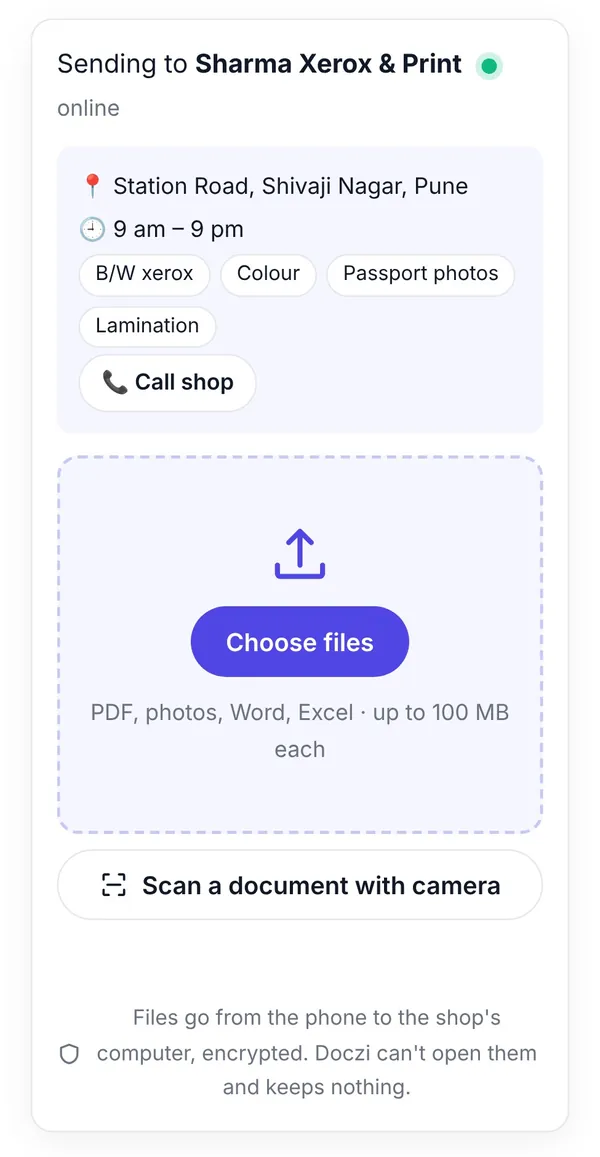
We built Doczi Drop for exactly this. The shop shows a QR code on its screen or poster; you scan it with your phone camera and choose your files. They appear on the shop’s computer. No numbers are exchanged, nothing goes into anyone’s phone gallery, and when the files pass through our server they’re encrypted on your phone first and deleted as soon as the shop receives them.
3. Carry a pen drive
Old-fashioned but private, if the shop’s computer is clean. Pen drives do pick up viruses in busy shops, so scan yours on your own computer afterwards.
4. If you must use WhatsApp
Turn on disappearing messages for that chat before sending, and ask the shopkeeper to delete the files after printing. Better still, ask them to set up Doczi Drop; it’s free for shops.
At the shop
- Collect all printouts, including test prints and spoiled pages. Misprints of IDs often end up in the dustbin by the counter.
- Don’t leave your originals behind.
- Write the purpose on photocopies of your ID where it’s sensible, for example “For SIM verification only, date”. It makes misuse harder.
What to say at the counter
Asking a busy shopkeeper to change how they work isn’t easy, so here are simple lines that work:
- “Can I send it without WhatsApp? Do you have a QR for files?”
- “Please delete the files after printing.”
- “Can I have the spoiled copy as well?”
Most shopkeepers are happy to delete files; they don’t want your Aadhaar either. If they’re interested in the QR idea, show them how shops receive files without WhatsApp. It’s free and quicker for them, which is the argument that actually convinces a shop.
FAQs
Is it illegal for a shop to keep my Aadhaar copy?
The law limits how Aadhaar data can be stored and used, but enforcement in small shops is weak. Don’t rely on it; limit what you leave behind.
Does Doczi Drop keep my files?
No. Files go to the shop’s open browser tab, and any piece that passes through our server is encrypted and deleted when delivered, within an hour at most.
Can I use masked Aadhaar for exam forms?
Exam forms usually ask for the number in the form itself, not a copy. For printing a copy for other uses, masked is often enough.
What if the shop doesn’t have a QR?
Show them how shops can receive files without a number. It takes them a minute.