The easiest way to keep your documents ready for online forms is one folder with six sub-folders: originals (your best photo, signature and thumb), ID proofs, education, category certificates, other certificates, and submitted forms. Keep high-quality originals there and make each form’s sizes from them when needed. The next application then takes minutes, not an evening of searching.
In this guide
Why bother
Most people apply to five to fifteen forms a year during exam season. Each one wants the same documents in slightly different sizes. Without a system, you end up re-photographing your signature, digging the 10th marksheet out of a cupboard, and using a WhatsApp copy of your photo that’s already blurry. With one, you open a folder and resize.
The folder structure
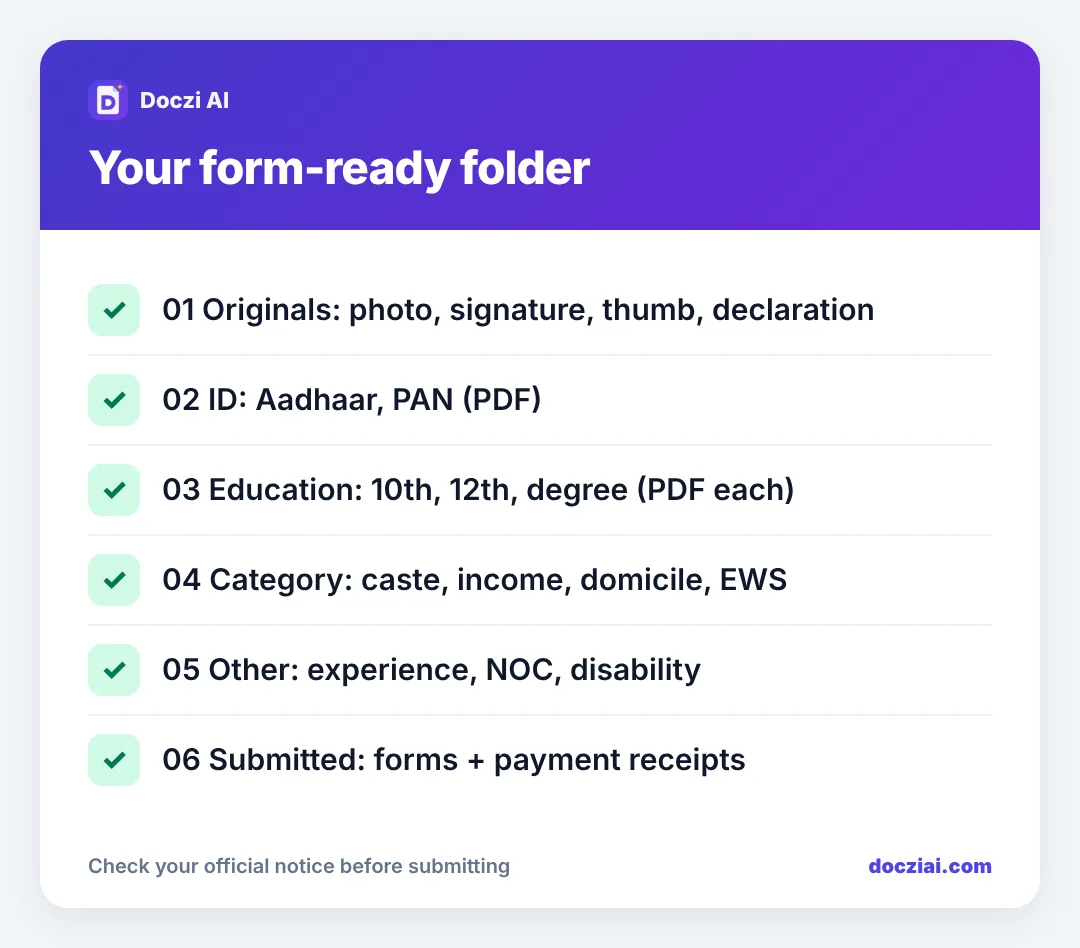
Make a folder called Documents-Forms in Google Drive, iCloud or your phone’s storage, with these inside:
01 Originals
Your best, full-size photo (taken in daylight against a white wall), signature on white paper, left thumb impression, and a handwritten declaration if you apply for bank jobs. Don’t put resized copies here, only the originals. See the master photo method.
02 ID
Aadhaar (unlocked PDF), PAN, voter ID, passport if you have one, driving licence.
03 Education
10th marksheet and certificate, 12th, each semester, degree, and any diploma, each as its own PDF. Also one merged file with all marksheets in order, since many admission forms want that; see merging marksheets.
04 Category
Caste, income, domicile, EWS, non-creamy layer. Note the issue date in the file name; some forms need a certificate issued after a certain date.
05 Other
Experience letters, NOC, disability certificate (UDID), sports or NCC certificates, bank passbook first page.
06 Submitted
The PDF of each submitted form and its payment receipt, named by exam and year. When the admit card comes out, you’ll need your registration number from here.
Name files so you can find them
Use names like 12th-marksheet-2023.pdf and income-cert-2026-03.pdf. Short, lowercase, hyphens, no spaces. Old portals sometimes choke on long names with brackets.
When a new form opens
- Read the notice’s upload section. Note the pixels and KB for photo and signature, and limits for documents.
- Find your exam on the exam size list and make the photo and signature from your originals.
- Compress any document that’s over the limit with Compress PDF.
- Save the resized files in a temporary folder for that exam, so you don’t mix them with originals.
Our checklist before filling any online form covers the rest.
Keep it updated
- Retake your original photo once a year, or whenever your look changes a lot. Several notices want a recent photo.
- Renew income and category certificates before they expire; some are valid for one financial year.
- Add each new marksheet as soon as results come out.
Is it safe to keep these in the cloud?
Use your own Google Drive or iCloud with a strong password and two-step login on. Don’t keep them in a WhatsApp chat with yourself, and don’t share the folder link. For ID documents, DigiLocker is the government’s own option; see DigiLocker vs scanned copies.
An example: applying to three forms in one week
Say SSC GD, a state police form and a scholarship all open in the same week. With the folder ready:
- SSC GD: live photo in the form; make the 300 × 150 px signature from your master signature. Five minutes.
- State police: open your state’s page on the exam list, make the photo and signature from the same masters. Five minutes.
- Scholarship: income and caste certificates are already compressed PDFs in folder 04. Two minutes.
Without the folder, the same week means re-signing, re-photographing and hunting for certificates three times. For school admissions you’ll want a similar folder for each child; see Navodaya and KVS uploads.
FAQs
Should I keep resized photos for each exam?
Keep them in that exam’s folder until the result. Always make new sizes from the original, not from an old resized copy.
How often should I update my photo?
Once a year is a good habit. Some notices ask for a photo taken within the last few months.
What’s the most commonly needed document?
Photo, signature, 10th certificate (for date of birth) and category certificate, in that order.
Can I keep these on a pen drive?
Yes, as a backup. Keep one copy in the cloud too in case the drive is lost.